When searching for the best 4K monitor for food editing, the key priorities are color accuracy, screen size, and reliability. The LG 27UP650K-W stands out as the overall best choice thanks to its sharp display and accurate colors, perfect for detailed food photography. The ASUS ProArt PA279CRV offers professional-grade HDR and calibration features suited for serious editors, while the BenQ MA270U balances color precision with connectivity for Mac users. Each of these options presents tradeoffs in price, size, or feature set, so understanding your specific needs is essential. Continue reading for the full breakdown of these top picks and what makes each suitable for food editing professionals or enthusiasts alike.

Get kitchen staples and gadgets delivered free with Prime
- Fast, free delivery on millions of items
- Prime Video, Amazon Music and more included
- Member-only deals all year
Key Takeaways
- Color accuracy and calibration features are the most critical factors for food editing clarity.
- Larger screens like 32-inch models offer more workspace but come at a higher cost and require more desk space.
- HDR support improves vibrancy but is less impactful if your editing workflow doesn’t include HDR content.
- Connectivity options, especially USB-C, streamline workflows for Mac users but may add to the price.
- Budget models like the LG 27UP650K-W provide great value but may lack the advanced calibration features found in higher-end options.
| LG 27UP650K-W 27-inch 4K UHD IPS Computer Monitor |  | Best Overall for Versatile Food Editing | Display Size: 27 inches | Resolution: 3840 x 2160 (4K UHD) | Refresh Rate: 60Hz | VIEW LATEST PRICE | See Our Full Breakdown |
| Dell 27 Monitor S2725QS 4K UHD IPS, 120Hz, FreeSync Premium |  | Best for Smooth Visuals with Moderate Color Gamut | Screen Size: 27 inches | Resolution: 4K UHD | Refresh Rate: 120Hz | VIEW LATEST PRICE | See Our Full Breakdown |
| ASUS ProArt PA279CRV 27-Inch 4K UHD HDR Professional Monitor for Mac |  | Best for Professional Color Accuracy & Calibration | Display Size: 27 inches | Resolution: 3840 x 2160 (4K UHD) | Color Coverage: 99% DCI-P3, 99% Adobe RGB | VIEW LATEST PRICE | See Our Full Breakdown |
| ASUS ProArt PA279CV 27-Inch 4K UHD USB-C Professional Monitor |  | Best for Color Accuracy & Versatile Connectivity | Display Size: 27 inches | Resolution: 3840 x 2160 (4K UHD) | Color Gamut: 100% sRGB, 100% Rec. 709 | VIEW LATEST PRICE | See Our Full Breakdown |
| BenQ MA270U 27” 4K Monitor for MacBook with USB-C, P3 Color Gamut, Adjustable Stand | 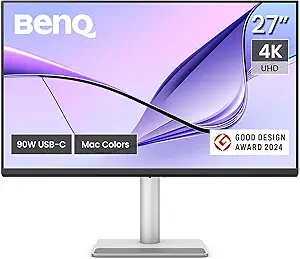 | Best for MacBook Users Needing Wide Gamut & Adjustability | Display Size: 27 inches | Resolution: 3840 x 2160 (4K UHD) | Color Gamut: P3 | VIEW LATEST PRICE | See Our Full Breakdown |
| Gawfolk 28 inch UHD 4K IPS Monitor with 3:2 Aspect Ratio, Built-in Speakers, and Multiple Connectivity Options |  | Best for Productivity and Versatility | Size: 28 inches | Resolution: 3840×2560 UHD | Aspect Ratio: 3:2 | VIEW LATEST PRICE | See Our Full Breakdown |
| LG 32UR550K-B 32-inch 4K UHD HDR Computer Monitor |  | Best for Vivid Visuals and Multitasking | Display Size: 32 inches | Resolution: 3840 x 2160 (4K UHD) | HDR: HDR10 | VIEW LATEST PRICE | See Our Full Breakdown |
| LG 27US500-W Ultrafine 27-Inch 4K UHD HDR10 IPS Monitor |  | Best for Color Precision and Compact Spaces | Display Size: 27 inches | Resolution: 3840×2160 (4K UHD) | Contrast Ratio: 1000:1 | VIEW LATEST PRICE | See Our Full Breakdown |
| 4k monitor for food editing | Resolution | Display Size | Color Gamut | Connectivity |
|---|---|---|---|---|
| LG 27UP650K-W 27-inch 4K UHD I | 3840 x 2160 (4K UHD) | 27 inches | 95% DCI-P3 | — |
| Dell 27 Monitor S2725QS 4K UHD | 4K UHD | — | — | — |
| ASUS ProArt PA279CRV 27-Inch 4 | 3840 x 2160 (4K UHD) | 27 inches | — | DisplayPort, USB-C 96W, HDMI, USB hub |
| ASUS ProArt PA279CV 27-Inch 4K | 3840 x 2160 (4K UHD) | 27 inches | 100% sRGB, 100% Rec. 709 | USB-C 65W, HDMI, DisplayPort |
| BenQ MA270U 27” 4K Monitor for | 3840 x 2160 (4K UHD) | 27 inches | P3 | 2 USB-C, HDMI, 2 HDMI |
| Gawfolk 28 inch UHD 4K IPS Mon | 3840×2560 UHD | — | 128% sRGB | — |
| LG 32UR550K-B 32-inch 4K UHD H | 3840 x 2160 (4K UHD) | 32 inches | 90% DCI-P3 | HDMI, DisplayPort |
| LG 27US500-W Ultrafine 27-Inch | 3840×2160 (4K UHD) | 27 inches | 90% DCI-P3 | HDMI, DisplayPort |
More Details on Our Top Picks
LG 27UP650K-W 27-inch 4K UHD IPS Computer Monitor
The LG 27UP650K-W stands out for its vibrant 4K UHD IPS panel with a wide 95% DCI-P3 color gamut, making it an excellent choice for food editing that demands accurate, lively colors. Compared to the BenQ MA270U, it offers a more flexible stand and HDR support, though it doesn’t match the latter’s Mac-specific calibration features. Its 60Hz refresh rate is sufficient for editing work but less ideal for fast-paced video adjustments. The HDR compatibility and smart multitasking features enhance workflow, especially for those juggling multiple food images or videos. However, the limited connectivity options mean less future-proofing. This monitor is best suited for food editors who prioritize color vibrancy and ergonomic flexibility in a versatile workspace.
Pros:- Vivid 4K UHD image quality with wide color spectrum
- Adjustable ergonomic stand for comfortable viewing
- HDR support enhances visual content
- Smart multitasking with Switch app
Cons:- 60Hz refresh rate may not suit high-end gaming or fast video editing
- Response time of 5ms might be noticeable in very fast-paced content
Best for: Food photographers and editors who need a vibrant, adjustable monitor for detailed color work.
Not ideal for: Gamers or fast-action video editors who require higher refresh rates and quicker response times.
- Display Size:27 inches
- Resolution:3840 x 2160 (4K UHD)
- Refresh Rate:60Hz
- HDR:DisplayHDR 400
- Color Gamut:95% DCI-P3
- Stand Adjustments:Height, Tilt, Pivot
Our verdict“A well-rounded, color-accurate monitor ideal for food editing and multimedia work requiring flexibility.”
Dell 27 Monitor S2725QS 4K UHD IPS, 120Hz, FreeSync Premium
The Dell S2725QS offers a significant upgrade in motion clarity with its 120Hz refresh rate, making it a strong contender for food editors working with both images and video. Its 99% sRGB coverage ensures accurate color reproduction, although it doesn’t quite reach the broader DCI-P3 range of the LG 27UP650K-W. The ultra-thin bezel design provides a modern look suitable for multi-monitor setups, but its limited info on ergonomic adjustments could be a drawback for prolonged editing sessions. While it supports HDR readiness, it doesn’t specify HDR certification, meaning color accuracy for HDR content might be limited. This monitor is best suited for editors who value smooth motion and color accuracy over the widest color gamut.
Pros:- High refresh rate for smooth video playback
- Vivid 4K visuals with 99% sRGB coverage
- Sleek, modern ultra-thin bezel design
Cons:- Limited ergonomic features or stand adjustments
- Sound quality improvements may be necessary for audio-centric workflows
Best for: Food videographers and editors who need fluid motion and decent color fidelity.
Not ideal for: Professional colorists requiring extensive color calibration or wider gamuts.
- Screen Size:27 inches
- Resolution:4K UHD
- Refresh Rate:120Hz
- Response Time:5ms
- Color Coverage:99% sRGB
- HDR:HDR ready
Our verdict“A solid choice for food video editing that benefits from smooth motion and decent color accuracy.”
ASUS ProArt PA279CRV 27-Inch 4K UHD HDR Professional Monitor for Mac
The ASUS ProArt PA279CRV excels at delivering near-perfect color fidelity with 99% DCI-P3 and Adobe RGB coverage, making it ideal for precise food editing where color correctness is paramount. Its factory calibration and Calman verification mean minimal post-calibration adjustments, unlike the BenQ MA270U. The extensive connectivity options, including USB-C with 96W Power Delivery, support seamless integration into professional workflows. The 5-year warranty offers peace of mind, though its higher price tag makes it less appealing for casual users. This monitor’s focus on accuracy and calibration makes it best suited for creative professionals demanding absolute color precision. It’s less suitable for casual or general-purpose use due to its premium price and targeted features.
Pros:- High-precision color accuracy with factory calibration
- Extensive connectivity including USB-C with Power Delivery
- High resolution with wide DCI-P3 and Adobe RGB coverage
- Long warranty and professional-grade features
Cons:- Premium price may be prohibitive for some
- Designed primarily for professional use, less suited for general tasks
Best for: Professional food photographers and color-critical editors.
Not ideal for: Budget-conscious hobbyists or those needing a more versatile, less specialized monitor.
- Display Size:27 inches
- Resolution:3840 x 2160 (4K UHD)
- Color Coverage:99% DCI-P3, 99% Adobe RGB
- Calibration:Calman Verified, Delta E < 2
- Connectivity:DisplayPort, USB-C 96W, HDMI, USB hub
- Warranty:5 years
Our verdict“A top-tier choice for professionals who need the highest color accuracy and reliable calibration in food editing.”
ASUS ProArt PA279CV 27-Inch 4K UHD USB-C Professional Monitor
The ASUS ProArt PA279CV offers excellent color accuracy with factory calibration and a 100% sRGB and Rec. 709 coverage, making it a practical choice for food editing. Its USB-C port supports 65W Power Delivery, simplifying setup for MacBooks and other laptops, similar to the BenQ MA270U, but with broader professional calibration credentials. The monitor’s 5ms response time and HDR support make it suitable for both detailed editing and multimedia. The 5-year warranty adds value, though some users may find the initial setup a bit complex. Compared with other professional options, it balances performance and affordability for content creators. This monitor is best suited for serious food editors who need reliable color accuracy and flexible connectivity.
Pros:- Excellent factory-calibrated color accuracy
- Wide sRGB and Rec. 709 gamut coverage
- USB-C with 65W Power Delivery for simple connectivity
- Extended warranty for peace of mind
Cons:- Display size listed as 23.8 inches in specs, which may be confusing
- Setup can be somewhat complex for new users
Best for: Food content creators who require accurate colors and versatile setup options.
Not ideal for: Casual users or those seeking a budget-friendly solution without calibration needs.
- Display Size:27 inches
- Resolution:3840 x 2160 (4K UHD)
- Color Gamut:100% sRGB, 100% Rec. 709
- Calibration:Calman Verified, Delta E < 2
- Connectivity:USB-C 65W, HDMI, DisplayPort
- Warranty:5 years
Our verdict“A reliable, professional-grade monitor suited for dedicated food editing workflows with flexible connectivity.”
BenQ MA270U 27” 4K Monitor for MacBook with USB-C, P3 Color Gamut, Adjustable Stand
The BenQ MA270U is tailored for MacBook users, with a vibrant P3 color gamut calibrated for Mac environments. Its 27-inch 4K display offers sharp detail, while the dual USB-C ports with 90W Power Delivery simplify connections and charging. Its adjustable stand provides ergonomic flexibility, an advantage over some rigid mounts. However, the listed display size as 23.8 inches creates some confusion, and lacking extensive professional calibration features makes it less suitable for critical color work. Compared to the ASUS ProArt PA279CRV, it emphasizes ease of use for Mac users but sacrifices some color precision. This monitor works best for Mac-based food editors who value convenience and wide color coverage.
Pros:- Vibrant P3 wide color gamut calibrated for Mac
- Dual USB-C ports with 90W power delivery
- Adjustable stand for ergonomic comfort
- Integrated MacBook controls for brightness and volume
Cons:- Limited to MacBook compatibility for optimal use
- No mention of professional calibration or broader color gamuts
Best for: MacBook users who need a portable, color-rich monitor with ergonomic adjustments.
Not ideal for: Windows-only workflows or users requiring ultra-wide color gamuts beyond P3.
- Display Size:27 inches
- Resolution:3840 x 2160 (4K UHD)
- Color Gamut:P3
- Connectivity:2 USB-C, HDMI, 2 HDMI
- Power Delivery:90W via USB-C
- Adjustments:Height, tilt, swivel, pivot
Our verdict“A practical, Mac-focused monitor with vibrant P3 colors and flexible ergonomics for casual and semi-professional food editing.”
Gawfolk 28 inch UHD 4K IPS Monitor with 3:2 Aspect Ratio, Built-in Speakers, and Multiple Connectivity Options
The Gawfolk 28-inch UHD 4K monitor stands out for its unique 3:2 aspect ratio, which provides extra vertical space—ideal for detailed food editing workflows that benefit from more room for timelines, ingredient lists, or multiple panels. Compared with the LG 27US500-W, it offers a higher resolution and wider color gamut, making it better suited for color-sensitive tasks. However, its maximum HDMI refresh rate is limited to 50Hz, which could hinder smooth motion editing or fast-paced content review. The inclusion of built-in speakers adds convenience, reducing clutter, but the stand lacks height adjustment, which might compromise ergonomic comfort during long editing sessions. For those valuing a blend of color fidelity, additional workspace, and connectivity options, this monitor offers a compelling package, despite its limited refresh rate and stand adjustments.Pros:- High-resolution 4K display with vivid color reproduction
- Unique 3:2 aspect ratio enhances vertical workspace
- Multiple connectivity options for flexible device connection
- Built-in speakers save desktop space
Cons:- Maximum HDMI refresh rate limited to 50Hz, limiting motion clarity
- No height adjustment or ergonomic stand customization
Best for: Food editors who need more vertical workspace and versatile connectivity for multitasking.
Not ideal for: High-end motion editors or gamers who require higher refresh rates and advanced ergonomic features.
- Size:28 inches
- Resolution:3840×2560 UHD
- Aspect Ratio:3:2
- Color Gamut:128% sRGB
- Refresh Rate:60Hz (50Hz HDMI limit)
- Inputs:2 HDMI 2.0, 2 DP 1.4
- Built-in Speakers:Yes
- Mounting:75×75mm VESA compatible
Our verdict“This monitor is best suited for professionals prioritizing vertical workspace and color accuracy over high refresh rates.”
LG 32UR550K-B 32-inch 4K UHD HDR Computer Monitor
The LG 32UR550K-B offers a larger 32-inch screen with sharp 4K resolution and HDR10 support, delivering vibrant images that make food textures and colors pop more effectively than the smaller LG 27US500-W. Its adjustable stand, including tilt, height, and pivot, provides tailored comfort—crucial during long editing hours. While it doesn’t include built-in speakers, its wide DCI-P3 color coverage and deep contrast are advantageous for color grading and detailed visual work. Compared to the Gawfolk monitor, it lacks a narrower aspect ratio but compensates with a larger display and a more adjustable stand. This model makes sense for those who prioritize color accuracy, ergonomic flexibility, and larger display real estate, though it misses out on integrated audio and has limited connectivity options.Pros:- Vivid 4K UHD display with HDR10 support
- Wide DCI-P3 color gamut ensures color accuracy
- Adjustable stand with tilt, height, and pivot for ergonomic comfort
- Large 32-inch screen enhances detail visibility
Cons:- No built-in speakers, requiring external audio solutions
- Limited connectivity options beyond HDMI and DisplayPort
Best for: Creative professionals who need a large, color-accurate display with ergonomic flexibility for extended editing sessions.
Not ideal for: Users seeking built-in speakers or a more compact workspace setup.
- Display Size:32 inches
- Resolution:3840 x 2160 (4K UHD)
- HDR:HDR10
- Color Gamut:90% DCI-P3
- Refresh Rate:60Hz
- Connectivity:HDMI, DisplayPort
- Stand Adjustments:Tilt, Height, Pivot
Our verdict“This monitor is ideal for users needing a sizable, vibrant, and ergonomically adaptable screen for detailed food editing.”
LG 27US500-W Ultrafine 27-Inch 4K UHD HDR10 IPS Monitor
The LG 27US500-W offers a compact 27-inch size with excellent 4K resolution and HDR10 support, making it suitable for detailed color work in tighter spaces. Its wide DCI-P3 color gamut provides rich, accurate colors, comparable to the larger LG 32UR550K-B but in a smaller footprint. Its ergonomic tilt adjustment adds some flexibility, though it lacks height or pivot adjustments—something that could affect comfort during prolonged editing. Unlike the Gawfolk monitor, it doesn’t have built-in speakers, but it compensates with a very good color performance and deep blacks. This monitor makes the most sense for those working in smaller setups or who prioritize color accuracy over screen size or additional features like integrated audio.Pros:- Vivid 4K UHD display with excellent color accuracy
- HDR10 support enhances visual fidelity
- Ergonomic tilt adjustment for comfortable viewing
- Compact size suits smaller workspaces
Cons:- No built-in speakers, requiring external audio devices
- Limited to tilt adjustment only, no height or pivot flexibility
Best for: Color-critical food editing in compact or space-constrained environments.
Not ideal for: Editors who need larger screens or built-in audio for multitasking or presentations.
- Display Size:27 inches
- Resolution:3840×2160 (4K UHD)
- Contrast Ratio:1000:1
- HDR:HDR10
- Color Gamut:90% DCI-P3
- Connectivity:HDMI, DisplayPort
- Stand:Tilt adjustment
Our verdict“This monitor is best suited for professionals seeking precise color reproduction in a smaller, space-efficient form factor.”

How We Picked
The monitors in this roundup were selected based on their relevance to food editing, focusing on color accuracy, resolution, size, and display quality. We prioritized models with IPS panels for consistent color reproduction and good viewing angles. Cost-to-performance ratio was also considered, ensuring options cater to different budgets without sacrificing core editing features. The ranking reflects a balance of professional features, user reviews, build quality, and value, with the top picks excelling in color fidelity and usability for food photography workflows.| 4k monitor for food editing | HDR |
|---|---|
| LG 27UP650K-W 27-inch 4K UHD I | DisplayHDR 400 |
| Dell 27 Monitor S2725QS 4K UHD | HDR ready |
| ASUS ProArt PA279CRV 27-Inch 4 | — |
| ASUS ProArt PA279CV 27-Inch 4K | — |
| BenQ MA270U 27” 4K Monitor for | — |
| Gawfolk 28 inch UHD 4K IPS Mon | — |
| LG 32UR550K-B 32-inch 4K UHD H | HDR10 |
| LG 27US500-W Ultrafine 27-Inch | HDR10 |
Factors to Consider When Choosing Best 4k Monitor For Food Editing
Choosing the right 4K monitor for food editing involves weighing several factors beyond just resolution. Accurate color reproduction is paramount, so look for models with high color gamut coverage and calibration support. Size matters because food editing benefits from a larger, more detailed display, but your workspace and budget will influence your choice. Connectivity options like USB-C can simplify your setup, especially if you work on a Mac or use portable devices. HDR support enhances vibrancy, but it’s less critical if your editing is primarily for web or print. Lastly, consider the monitor’s calibration capabilities and build quality to ensure consistent, long-term performance.Color Accuracy and Gamut Coverage
For food editing, color fidelity is non-negotiable. Monitors with wide color gamuts like DCI-P3 or Adobe RGB provide the richness and precision needed for true-to-life food images. Calibration support, either built-in or via external tools, ensures your colors stay consistent over time. Skipping calibration or choosing a monitor with limited color coverage can lead to inaccurate edits, which may compromise your final output. Prioritize models that explicitly mention professional-grade color accuracy.Screen Size and Resolution
A larger screen, such as 27 or 32 inches, offers more workspace, making it easier to see fine details in food photos. 4K resolution ensures sharpness and clarity, which are vital for editing intricate textures and colors. However, bigger screens demand more desk space and can be more expensive. Balance your workspace constraints with your need for detail: if space is limited, a 27-inch monitor with 4K resolution still delivers excellent image quality.Connectivity and Compatibility
Modern workflow often relies on USB-C or Thunderbolt ports for quick, single-cable connections to laptops and peripherals. Monitors with these options reduce clutter and simplify setup, especially for Mac users. However, these features tend to increase the price, so consider whether your current devices support them or if an adapter is an acceptable compromise. Additionally, check for multiple input options if you plan to switch between different devices frequently.HDR and Brightness Levels
HDR support can make food images pop with vibrant colors and better contrast, especially when editing for digital platforms. Look for monitors with at least 400 nits of brightness and HDR10 support for noticeable improvements. Keep in mind, HDR is less relevant if your workflow mainly involves standard dynamic range content. For precise editing, a monitor with good contrast ratio and consistent backlighting is more important than just HDR support.Calibration and Build Quality
A monitor with factory calibration or the ability to calibrate easily helps maintain color accuracy over time. Reliable build quality ensures durability and consistent performance, reducing frustration during long editing sessions. Features like adjustable stands, VESA compatibility, and anti-glare coatings add to usability, especially when working for extended periods. Skimping on calibration or build quality can lead to color shifts and ergonomic issues.Frequently Asked Questions
Is a higher refresh rate important for food editing?
While higher refresh rates, such as 120Hz, are beneficial for gaming or video editing, they are not a priority for static food images. Food editing primarily benefits from color accuracy and resolution. A standard 60Hz refresh rate is sufficient, but if you also do video editing or want smoother interactions in your workflow, the higher refresh rate can be a welcome addition.Should I choose an ultrawide monitor for food editing?
Ultrawide monitors can provide more horizontal workspace, which might appeal to those working with multiple images or extensive editing tools. However, they often come at a higher price and may have less accurate color reproduction than dedicated professional-grade monitors. For most food editing needs, a well-calibrated 27-inch 4K IPS monitor offers a more straightforward and cost-effective solution.How important is HDR support for food editing?
HDR support can enhance vibrancy and contrast in food images, offering a more dynamic viewing experience. However, if your primary focus is editing for web or print, HDR is less critical. It’s more beneficial if you work with HDR content or plan to showcase your images on HDR-compatible displays. Otherwise, prioritize color accuracy and calibration over HDR support.What is the best monitor size for detailed food editing?
A 27-inch monitor strikes a good balance between detail and desk space, making it ideal for most food editing tasks. Larger screens, like 32 inches, offer more detail but require more room and a higher budget. Smaller monitors might save space but can compromise on workspace clarity, especially at 4K resolution. Your choice should match your workspace and how much detail you need to see.Can I use a regular gaming monitor for food editing?
While gaming monitors often feature high refresh rates and fast response times, they typically lack the color accuracy and calibration options needed for professional food editing. Some gaming monitors do have decent color coverage, but unless they are specifically calibrated or support wide gamuts like DCI-P3, they may not deliver the color fidelity required. For critical editing, dedicated professional monitors remain the better choice.Conclusion
For those seeking the best overall experience, the LG 27UP650K-W offers a reliable balance of size, resolution, and color accuracy at a compelling price. If budget is your main concern, the Gawfolk 28 inch UHD 4K IPS Monitor provides solid performance without sacrificing quality. Professionals who need top-tier calibration and HDR support should consider the ASUS ProArt PA279CRV or PA279CV, especially for detailed food editing workflows. Beginners or casual food photographers will find the LG 27US500-W an accessible option. Ultimately, your choice should align with your workspace, budget, and the level of color precision required for your food editing projects.Fall Picks
fall essentials
As an affiliate, we earn on qualifying purchases.